

Tools > Image Tile Extractor
Splits images into a specified number tiles. Can accept a mixture of images and folders of images. An “image_tiles” folder is created in the specified output location.
Especially useful for subsectioning images prior to applying a Spotlight-based recipe to automate feature tracing for Deep Learning model training. Spotlight and Snap’s resolution improves as the field of view shrinks and features occupy a larger fraction of the image.
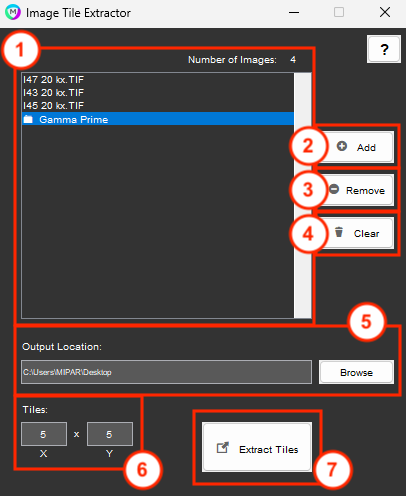
1. Images and Folders
List of images and folders to process for tile extraction. Count will reflect number of individual images plus number of images in the root of all selected folders. Folder entries in the list are denoted by a folder icon. Drag and drop images and folders into this box to add.
2. Add
Browse the file explorer to add images and folders.
3. Remove
Remove images and folders from the list.
4. Clear
Remove all images and folders from the list.
5. Output Location
Folder where tiles should be output. Set by default to the parent directory of the first image or folder added to the list. Can be changed either by browsing the file explorer of manually typing a valid folder path. An “image_tiles” subfolder will be created to store all tiles in the output directory.
6. Tiles
Number of tiles to split each image into in X by Y format.
7. Extract
Perform the tile extraction. A status message will appear to the right after extraction to confirm the number of extracted tiles.
Need more help with this?
Chat with an expert now ››
