

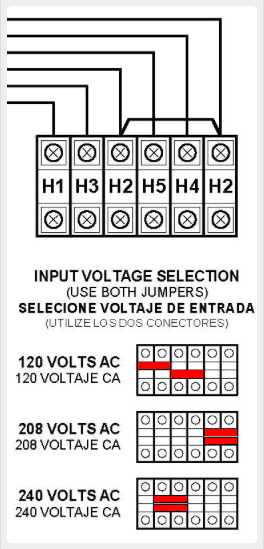
Before connecting ac power to ATevo, inspect the existing input voltage setting. Confirm the correct jumper positions for the desired ac input supply voltage. The multi-tap ac input voltage setting can be verified without removing the safety shield.
  • Open the ATevo front panel door.
  • Locate the multi-tap terminal block above the AC Input Breaker (CB1).
  • Identify the relative locations of the RED jumpers in the multi-tap block (TB-H#).
  • Refer to the left diagram to confirm the existing voltage setting is correct.
  • Wiring at jumper terminal block (TB-H#) is never to be removed.
  • Voltage settings are selected, using jumpers only.
Last modified: 11 September 2025

Need more help with this?
Don’t hesitate to contact us here.

Thanks for your feedback.