


ATevo has a dedicated hardware circuit that can shut down the charger should a catastrophic microprocessor failure occur and the rectifier control become locked to the full ‘on’ state.
The setting for the Analog High Voltage Shutdown jumper determines whether the High Level Detect circuit is enabled or disabled.
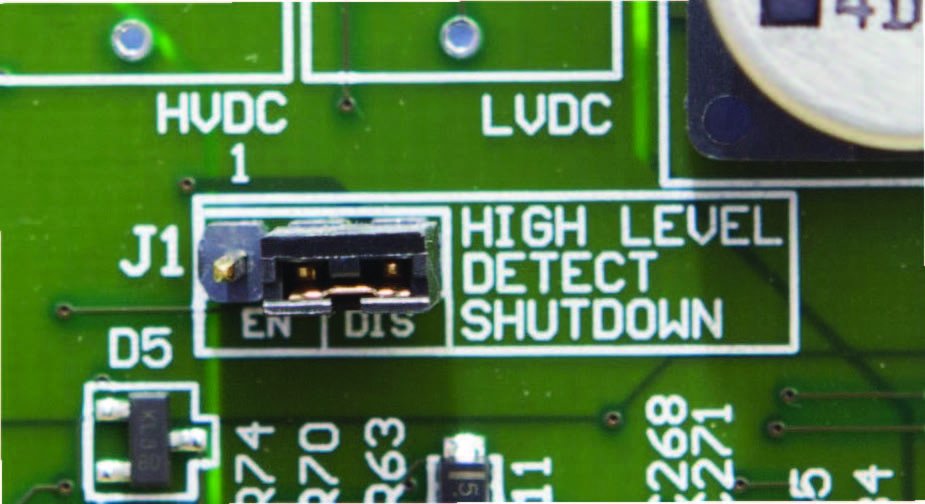
The High Voltage Shutdown jumper (J1) is located center right on the Main Control Board (A1).
To change the enable/disable status of the High Level Detect circuit:
- Turn OFF (open) both AC Input (CB1) and DC Output (CB2) Circuit Breakers.
- Open the ATevo front panel door.
- Locate the Main Control Board (A1) on back of the door.
- Locate jumper (J1) labeled ‘High Level Detect Shutdown’ on the center right of the Main Control Board (A1).
- Move jumper shorting block as follows:
- ‘EN’ to enable the High Level Detect Shutdown
- ‘DIS’ to disable the High Level Detect Shutdown
- Close the front panel door.
- Turn ON (close) both Circuit Breakers (CB1/CB2).
See Section 5.4 for more information on the High Level Detect feature.
Last modified:
3 August 2023
Need more help with this?
Don’t hesitate to contact us here.