


Let’s now map the process “Select Candidates.”
It is important to mention to constantly save your process map using the  button available on the toolbar. This enables you to limit the risks of losing your work
1. Select the sub-process “Select Candidates;” navigate to the Graph View, and click on the  button to navigate to the mapping canvas.
2. Select the Start Event shape from the BPMN toolbar, and drag it to the mapping canvas using the left-click on your mouse.
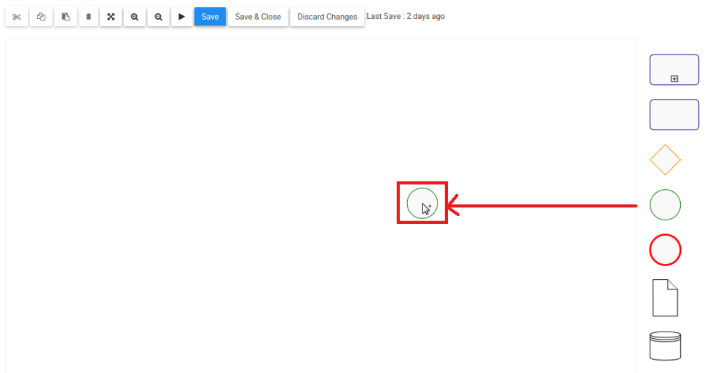
3. Select the Task shape from the BPMN toolbar, and drag it to the mapping canvas using the left-click on your mouse.
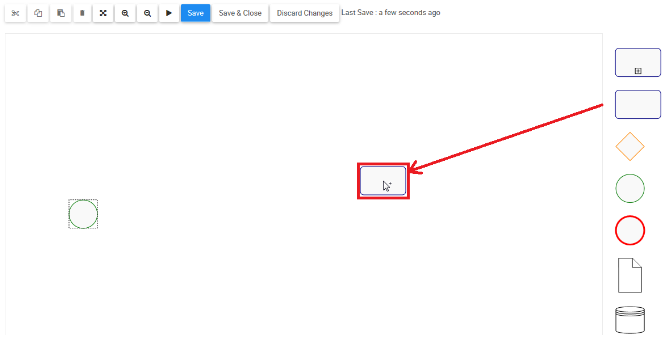
4. Let’s now name the task. Double-click on the task shape, and a box will be generated where you can type the name of the task. Type “Review Posting.”
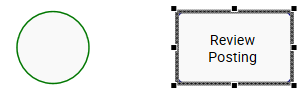
5. Let’s now connect the two shapes. Hover over the source shape, the start event, and drag out the flow (left-click hold) to the target shape, the task. The target shape will have port points (green squares); release the flow in the desired port.
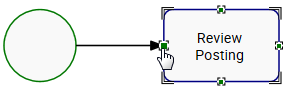
6. Repeat steps 3 to 5 recreate this process. Remember to constantly save your process map using the button.
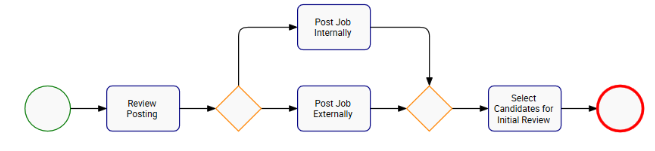
*Use the  Auto Layout button on the graph toolbar to optimize the layout of the process
Besoin d'aide supplémentaire avec ce sujet?
Visit the Support Portal