


If the ATevo is ordered with the forced load sharing feature, the hardware and software configuration will be completed at the factory. The forced load sharing Serial Communications Adapters (A13) and software will be verified during production test.
If forced load sharing is added to the ATevo in the field, the following three (3) hardware and software configurations will be required.
13.3.1 Installing Serial Communications Adapter (A13)
Refer to the supplementary ATevo Communications Manual (JA0102-54 PDF or JA0102-54 online) for more information and how to install and wire the Serial Communications Adapter.
13.3.2 Configuring Serial Communications Hardware
The jumpers on the Serial Communications Adapter (A13) must be configured to operate in 2-WIRE RS-485 mode.
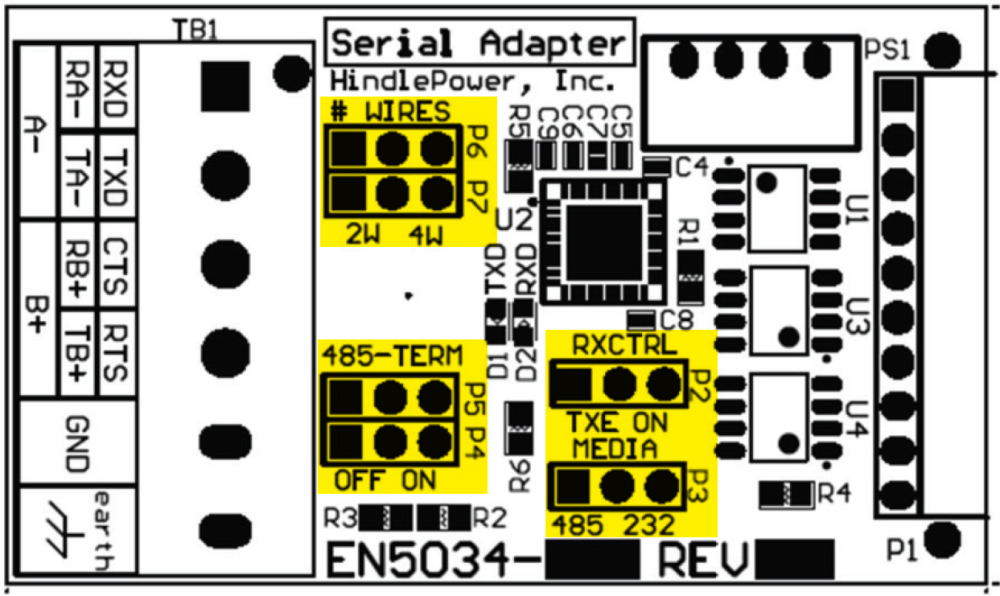

| 2-Wire RS-485 Settings | ||
|---|---|---|
| Jumper(s) | Label | Setting |
| P2 | RXCTRL | TXE |
| P3 | MEDIA | 485 |
| P4, P5 | 485-TERM | OFF |
| P6, P7 | #WIRES | 2W |
Last modified:
2 August 2023