

Batch Indexing allows documents to be scanned into the RVI system then indexed at a later time. This is very time and cost effective because you can have multiple users indexing batches of documents at the same time.
To Batch Index:
- Select


- Choose


- Single mouse click the batch to be worked.
 The Batch Name is automatically created when the documents are scanned. The Count is the total number of records in the batch. The User, Date, and Time values are also defined to the scanned batches. These values are displayed when the batches are displayed so the user knows who scanned the batch and when the batch was created.
Note: The Batch Index List will indicate if any batches are currently being indexed. These batches are locked. Only one batch can be indexed at a time. The locked batches will show who has the batch locked and when the batch was locked. When the user exits the batch indexing page by clicking the Back button, the batch will be unlocked. If the session is closed without first exiting the batch, the batch will remain locked and will have to be manually unlocked.
- Double click the first image in the batch.
To queue up the entire batch, click the box next to Flags to mark all records in the batch then select Display Checked.
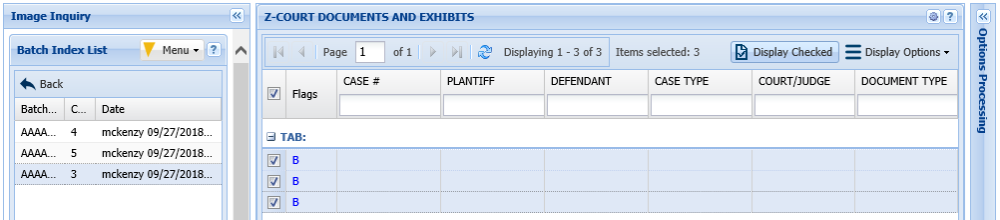 |
- Index the image.

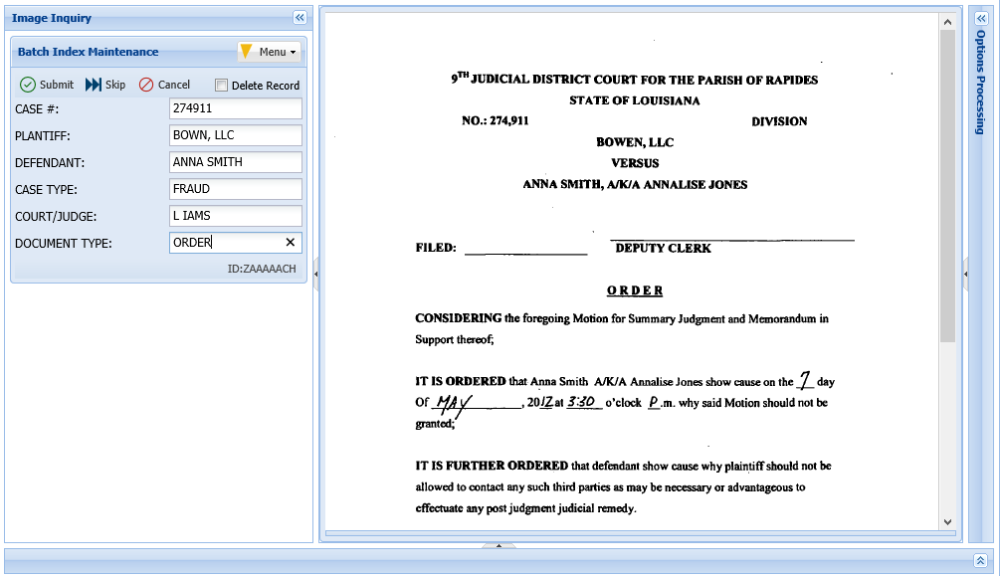
- Click
 to save the index values and move to the next document in the batch.
 to save the index values and move to the next document in the batch.
OR
- Click
 to temporarily skip the current document and move to the next document in the batch.
 to temporarily skip the current document and move to the next document in the batch.
| Cancel: | Exits the batch process without updating the current record. |
| Delete Record: | Permanently delete the document. |
Post your comment on this topic.