


The toolbar on the Risk Module provides users with a variety of functions to navigate and leverage the details page.
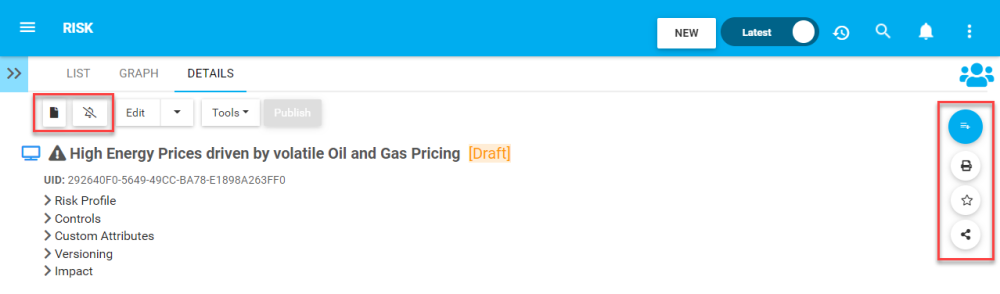
Section 1: items are focused on user viewing and graph functionality. Please see the table below for a full list and description of each item.
| Item | Icon | Description |
|---|---|---|
| Object Book |  |
This button will allow a user to select and generate an Object Book from a template for thew selected Risk |
| Subscribe |   |
This button will allow a user to subscribe to the document being viewed. The icon will be displayed in white when a user is not subscribed to an item or in blue when a user is subscribed to an item. |
Section 2: This toolbar provides users with the ability to print the details page, mark as a favorite and to copy the URL of the page
| Item | Icon | Description |
|---|---|---|
 |
This button will allow a user to print the details page being viewed | |
| Favorite |  |
Allows users to sort by favorites in the “My Actions” widget |
| Share |  |
Copies URL to user’s clipboard to share This button will allow a user to subscribe to the document being viewed. The icon will be displayed in white when a user is not subscribed to an item. The icon will be displayed in blue when a user is subscribed to an item. |
Need more help with this?
Visit the Support Portal