
Layer Presets save all aspects of a media layer
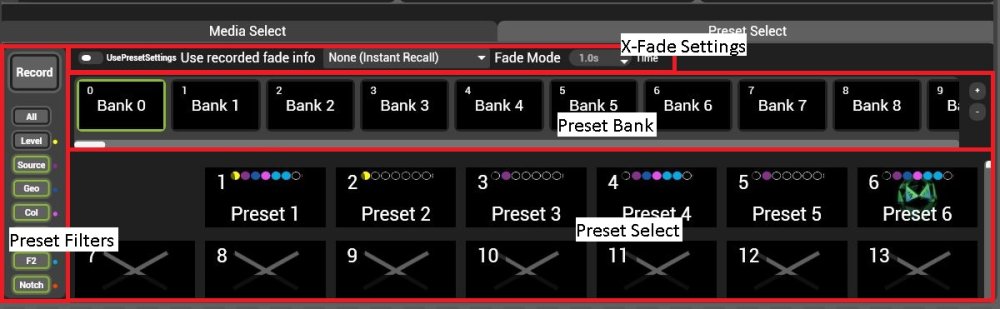
Presets have four main sections:
Preset bank and select
Each Preset bank contains 255 preset select slots.
A single Integer pin (0-65535) selects each preset sequentially, so Bank 1, Preset 1 is a value of 257.
In order to toggle a preset the value of the pin must change. From a DMX desk, it is often easiest to toggle the value from 0 (Bank 0, Preset 0 cannot be recorded to) then set the pin to the desired preset value before returning it to 0. When toggling from Midi, use action mappings in Multicontroller to automate this process.
X-Fade Settings
All layer presets save the x-fade state of the layer as they are recorded. The X-fade settings override this setting to quickly allow the fade time to be set on the fly.
Preset Filters
The preset filters determine what attributes are saved or recalled from a selected preset.
 Selects or deselects all filters
 Filters the layer level
Contains:
- Mixer/Level
 Filters the layer source and mix mode
Contains:
- Source / MediaPlayer
- Source / Generator
- Source / Liveinput
- Source / Relays
- Source / NDI
- Source / Spout
- Mixer / Mixmode
- Key
 Filters the layer Geometry, Videomap, Aspect and keystone
Contains:
- Geometry
- Keystone
- Videomapper on layer
- Live Mask
 Filters colour
Contains:
- Colour
 Filters Effects 1
 Filters Effects 2
 Filters Notch parameters and setup
Contains:
- Notch/Parameters
- All Notch Settings
Using Filters
- Filters work both in saving and applying presets. It is usually best to either filter while saving or filter while playing back.
- Double clicking a filter will solo it.
Post your comment on this topic.