


Now that your BPMN objects are linked together, you need to add Inputs and Outputs. Inputs and Outputs define the flow of work between the shapes within a process. They represent the inputs required to start an activity and the outputs produced once the activity is completed.
Add Materials to the Process
1. Select the sub-process “1.1 Develop Job Description;” navigate to the Graph View, and click on the  button to navigate to the mapping canvas.
2. Navigate to a flow in the process map, and right-click on it. A drop-down menu will be generated where you will choose the Inputs/Outputs box.

3. A window will be generated where you will type the name of the Input/Output: “Job Description,” and select it.
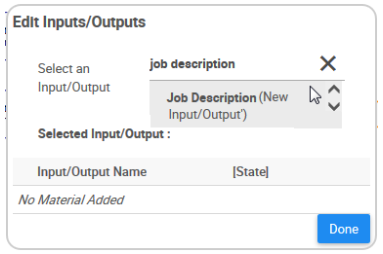
4. The Input/Output will now be on a table. Click on the  icon to type the state of this Input/Output, which is “Exists,” and then click on the
  button to finish creating the Input/Output.
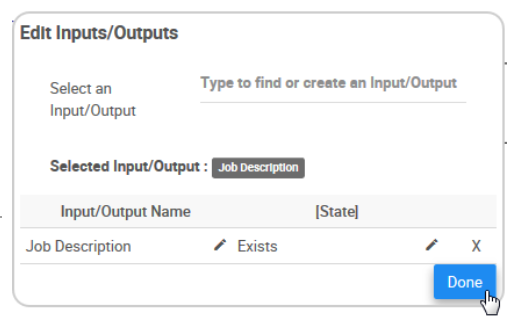
5. Click on  to save the changes made. The Input/output will now be displayed on top of the flow in the process map with the icon
  ; click on the icon to see the name.

6. Click on  to save the changes made, and exit the Edit Mode.
Besoin d'aide supplémentaire avec ce sujet?
Visit the Support Portal