


To make connections and configure settings for 3-Wire connections between the Serial Adapter and an RS-232 network, use the following diagram and tables:

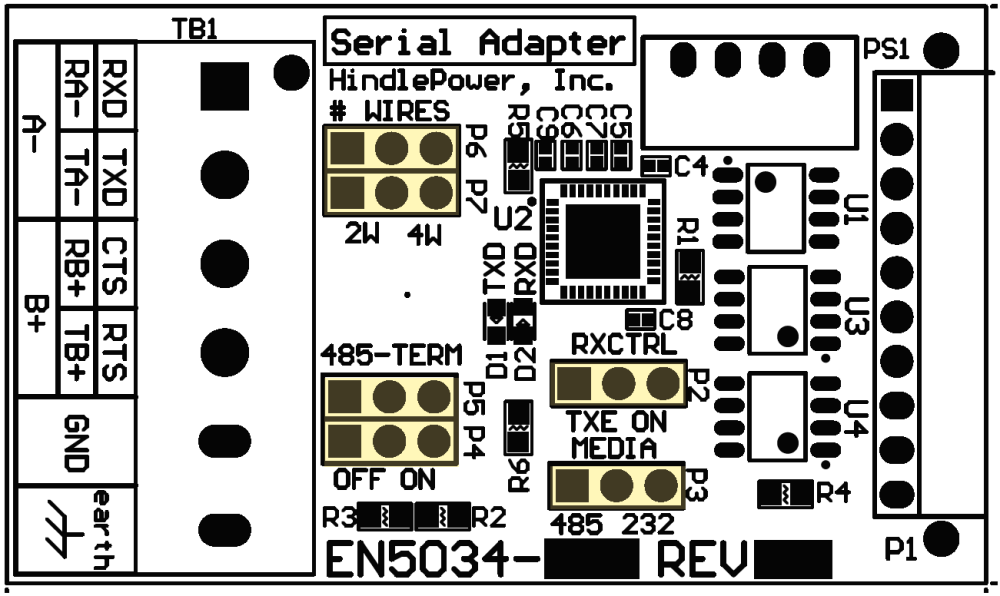
| 3-Wire RS-232 Settings | ||
|---|---|---|
| Jumper(s) | Label | Setting |
| P3 | MEDIA | 232 |
| P6, P7 | #WIRES | 4W |
| P2 | RXCTRL | ON |
| P4, P5 | 485-TERM | OFF |
| Wiring Serial Adapter to RS-232 Network | ||
|---|---|---|
| Adapter | to | RS-232 |
| RXD (TB1-1) | to | TXD |
| TXD (TB1-2) | to | RXD |
| GND (TB1-5) | to | COM |
Last modified:
23 October 2023