


My Log has been added to the Dynamic Work Center folders. This will enable users to view the productivity report statistics for themselves.
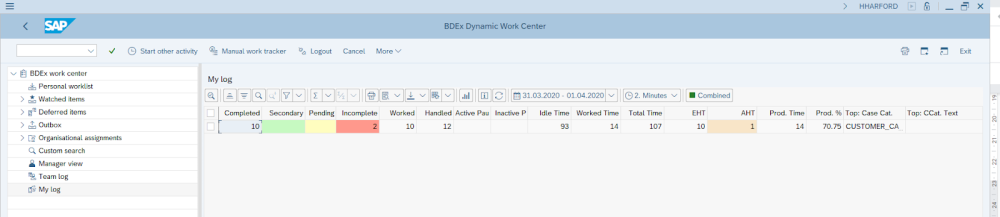
The report will display the following columns:
| Headings | Description |
| Sessions | Number of sessions launched from DWC to CCH |
| Actions | Number of actions processed |
| Completed | Number of cases Completed when the case was used to launch a CCH session |
| Secondary | Number of additional cases completed in the CCH (not the primary case used to launch the CCH session) |
| Pending | Number of cases deferred |
| Incomplete | Number of cases not completed or deferred when the case was used to launch to CCH session |
| Worked | Total of completed and deferred cases |
| Handled | Total of worked and incomplete cases |
| Active Paused time | total time spent in pause for an active pause reason |
| Inactive Paused time | total time spent in pause for an inactive pause reason |
| Idle time | Time spent logged into BDEx but not working or paused |
| Worked time | Time spent working cases in CCH |
| Total time | Total logged on time in BDEx |
| Expected handling time | Total time expected to be spend for all worked cases |
| Average handling time | Average time took to work 1 case |
| Productive time | Total worked time and active pause |
| Productive % | Calculation of the users productivity, productive time/estimate handle time * 100 |
| Top: Case Category | Which case category was handled the most |
| Top: CCat. Text | a description of the case category handled the most |
| Top: Count | Total number of the most handled cases |
| BDEx Start Date | What date did the user last log in to BDEx |
| BDEx Start Time | The first time stamp for the user on the above date |
Post your comment on this topic.