


EZ-Qube-W & EZ-Qube-W-Ai Bluetooth Set-Up
Setting parameters and monitoring status for EZ-QUBE-W and EZ-QUBE-W-Ai modules is performed via a built-in Bluetooth interface. You can use any Bluetooth enabled device to connect to these modules once you download and install our EZ-QUBE Mobile App. The EZ-QUBE Mobile App is available for both IOS and Android operating systems.
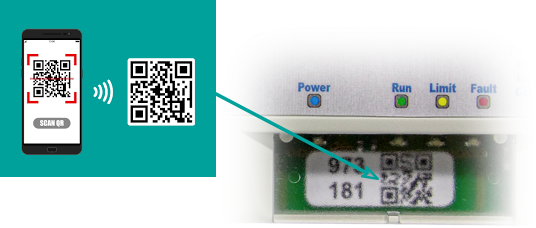
Once you start the EZ-QUBE Mobile App, you can choose to Scan the QR Code on the module you want to connect to or Discover modules close to you.
Scan Barcode
| From the initial main screen, touch Scan Barcode and it will activate your default QR code scanning app or camera. When connected to the module, the General screen appears | 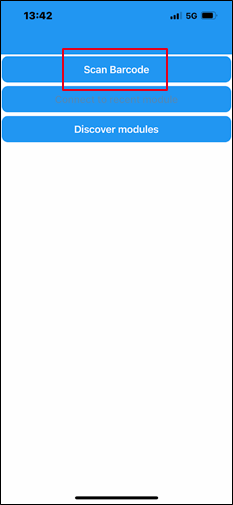 |
 |
 |
|
 |
Discover Modules
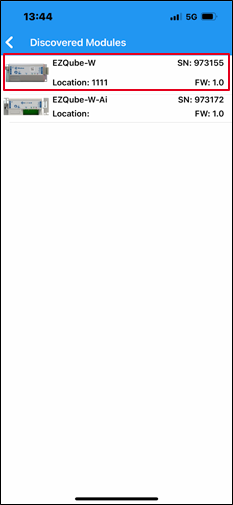
| From the initial main screen, touch Discover and the app will search for modules within its Bluetooth range. The app will then show the EZ-QUBE model, Serial Number, and Firmware revision for each module discovered. Tap the module you want to connect to and when connected to the module, the General screen appears | 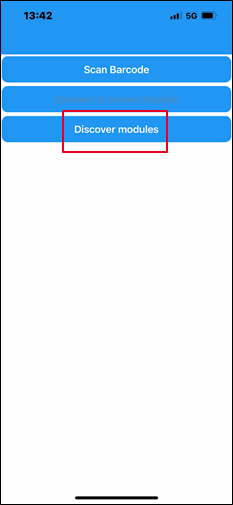 |
|
 |
|
|