


In some cases you can change the PNP/NPN operation of the SPEED and/or ERROR output signals by changing internal jumper settings on the EZ-Qube Module module’s circuit board
CAUTION !!!!
Modifying internal jumper settings involves removing the module’s plastic housing cover. Handling the EZ-Qube Module module without the cover must only be done by personnel who have been adequately electro-statically discharged. Handling the module with the housing cover removed without proper ESD precautions may result in module damage
On the PCB of the EZ-Qube Module there are three (3) jumpers:
| Jumper | Description |
|---|---|
| Error | Error output can be either PNP or NPN |
| Speed | Speed output can be either PNP or NPN |
| Err.Type | When Error is active, signal can be either ON or OFF |
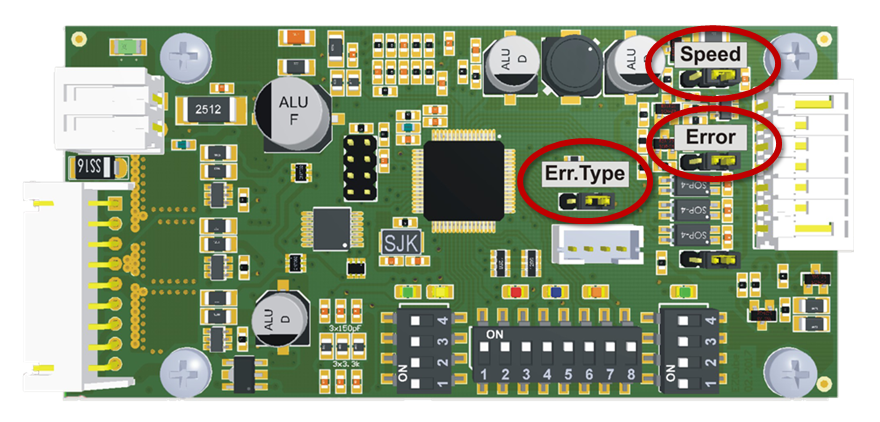
ERROR Output States
| Jumper Position | Module Version | When No Error is Active | When Error is Active | |
|---|---|---|---|---|
| Err.Type | Error | |||
 |
|
NPN | ON | OFF |
 |
|
NPN | OFF | ON |
|
|
PNP | OFF | ON |
|
|
PNP | ON | OFF |
SPEED Output
| Jumper Position | SPEED Output |
|---|---|
| |
NPN |
| |
PNP |