


The integration framework can also take into account value conversions. For instance where a value in ActiveControl could equal one thing maybe its corresponding value in an external system could be different although they both mean the same thing. BTI/TE_INT_CONV is used to map the two values together and address these issues; the conversion can happen either way, which means that the fields can contain either ActiveControl or the 3rd Party ITSM value.
| Field | Explanation of Field |
|---|---|
| EXTSYS_NO | Integration system number [from /BTI/TE_INT_SYST] |
| EXTSYS_NAME | External System Name [from /BTI/TE_INT_SYST] |
| EXTERNAL_REF | Field Reference |
| EXTFLD_ID | External System Field ID. This is the External System field value that the conversion needs to take place on. |
| EXTFLD_VAL | External System Field Value. This is the converted value that needs to be fed into the integrated system (or AC) Groups: GUIDs from /BTI/TE_GROUPS Types: GUIDs from /BTI/TE_TYPE Priority: Low = 1, Normal =2, High = 3, Emergency=4 Project: GUID from /BTI/TE_PROJ |
Example Customer Configuration
The below illustrates some example configuration of /BTI/TE_INT_CONV table at a customer implementation of the ActiveControl ChaRM integration.
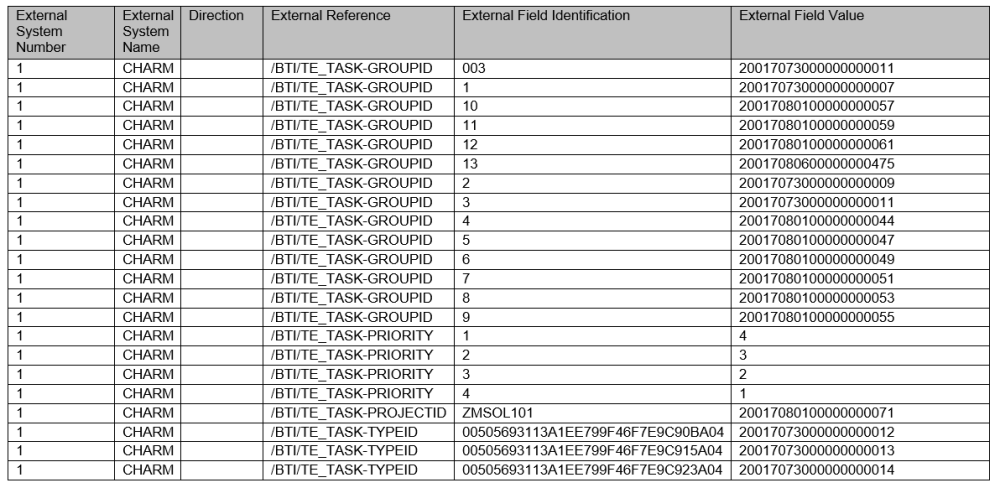
Figure: Example customer configuration of /BTI/TE_INT_CONV
Post your comment on this topic.