


The next step is to define the Form Control Behavior for the Nested Form Link
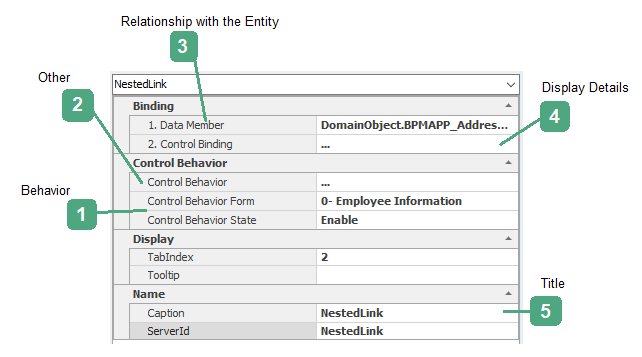
1.Behavior:

Current form behaviors (See 7.2) are displayed in the “form” section.
Enable: If this option is selected, the control will be enabled on the web.
Disable: If this option is selected, the control on the web is disabled and the user will not be able to interact with it.
+Invisible:+If this option is selected, the controls will be invisible to users on the web
2.Others:

Determining access to nested form functions (adding, editing, deleting the form) and validating the control is set using this menu.
Clicking on this section and selecting the button  will display the Behavior of Edit Form.
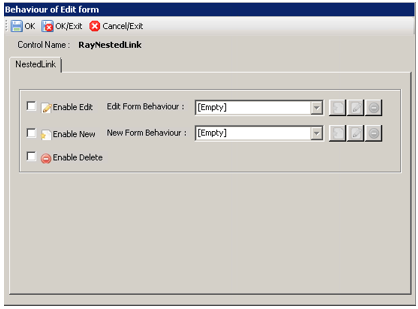
Enable Edit: By selecting this option and specifying its behavior, the ability to edit the form (See 7.1.2.10.5) is enabled
Enable New: By choosing this option and specifying its behavior, the ability to add a form (See 7.1.2.10.5) is enabled
Enable Delete: By selecting this option and specifying the behavior, the ability to delete the form (See 7.1.2.10.5) is enabled
3.Relationship with the Entity:

Users can link attributes to the control by clicking on the button. For more about the object browser, see 7.1.2.6.2
4.Display Details:

Clicking on this section and selecting the button will display the display details of the linked attribute. For more information, see 7.1.2.6.3
5.Title:

The control is given a default name. The name of the control can be edited by clicking on this box.